
Automating Driver Assignments and Shift Scheduling for Shuttle Fleets
 Mobility Infotech
 July 24, 2026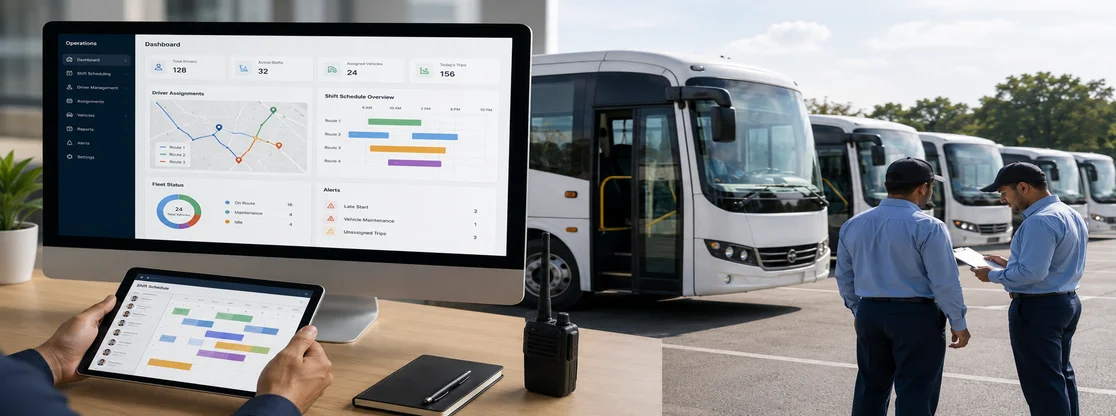
Shuttle operations hardly break because of vehicles. They break because of other reasons behind the veil - at 5:40 a.m., a driver calls out sick, and a dispatcher has just a few minutes to find a replacement, check whether that person is legally allowed to drive, and get the confirmation that they can reach the depot before the first pickup.
That time scramble between the first driver not being able to go for the job and finding the new driver is a scheduling problem, and it is entirely solvable with software. Here we cover both halves of the fix: the dispatcher-side automation that builds and repairs the schedule, and the driver-side mobile app that carries it into the field.
These two are not separate purchases but complementary to each other: a scheduling system without a driver app is like creating a schedule that no one can see. Drivers need to receive trips, updates, and routes in real time for the system to actually work.
Quick Summary of What's Ahead
Automating shuttle driver assignments means letting software match drivers to routes based on rules you pre-define - availability, certification, hours worked, home depot, seniority, etc instead of a dispatcher doing it manually. Modern shuttle driver scheduling software builds the roster, checks compliance, pushes shifts to a driver mobile app, and reassigns automatically when someone calls out. Operators who make the switch typically report fewer missed runs, lower overtime spend, and a dispatcher who no longer spends the first two hours of every shift on the phone.
Why Manual Driver Scheduling Fails at Scale
A single-route hotel shuttle with four drivers does not need automated software; they can handle it manually. The trouble starts when drivers and routes keep increasing, and the number of possible valid schedules exceeds more than what a person can hold in their mind and simple Excel sheets. Here is what actually goes wrong:
- Overtime creeps in invisibly. A dispatcher assigning shifts one at a time cannot see that Marcus is at 38 hours until payroll runs on Friday. By then it is a cost, not a decision.
- Certifications lapse quietly. Commercial licenses, medical cards, passenger endorsements, and defensive-driving refreshers all expire on different dates. On a spreadsheet, an expired credential looks identical to a valid one.
- Call-outs cascade. Reassigning one driver at 5:40 a.m. means checking who is off, who is rested, who is qualified for that vehicle class, and who lives close enough. Under pressure, dispatchers pick whoever answers the phone, which is how the same three reliable people end up burnt out and the rest stay underutilized.
- Nobody knows who is where. The dispatcher has the roster in one system, the routes in another, and the drivers' actual locations nowhere at all. When a corporate client calls asking why the 8:15 campus loop is late, the honest answer is a guess.
- Schedule changes do not reach drivers. A change made in the office at 9 p.m. reaches the driver when they show up at the wrong depot the next morning.
Each of these is a rules problem. Rules are what software is good at.
What Driver Assignment Automation Actually Does
Automated assignment is not a black box that picks names at random. It is a constraint solver: you tell it what a valid assignment looks like, and it finds combinations that align every constraint at once.
The constraints worth encoding
| Constraint type | Examples | Why it matters |
| Availability | Declared unavailability, approved time off, standing preferences | Prevents assignments the driver will decline |
| Qualification | Vehicle class, passenger endorsement, wheelchair-lift training, airport badging | Blocks non-compliant assignments before they are published |
| Hours & rest | Weekly hour caps, minimum rest between shifts, consecutive-day limits | Keeps you inside labor rules and DOT hours-of-service where applicable |
| Geography | Home depot, commute distance, route familiarity | Reduces deadhead time and late starts |
| Fairness | Seniority, rotation of undesirable shifts, hour equity across the roster | This is the one operators skip, and the one that drives turnover |
| Cost | Overtime thresholds, premium-pay windows, part-time vs. full-time mix | Turns scheduling into a budget lever |
Once those are in place, the software does four jobs.
1. Builds the Base Roster
You define recurring routes and their shift patterns - the 6:00 a.m. airport run, the campus loop every twenty minutes from 7 to 10, the evening employee shuttle. The system generates assignments for the whole period, respecting every constraint above. What took a full day in a spreadsheet takes a few minutes, and the output is compliant by construction rather than by review.
2. Repairs the Roster When Reality Intervenes
This is where the real value sits. A driver calls out. Instead of a dispatcher working the phones, the system:
- identifies every qualified, available, rested driver
- ranks them by cost, proximity, and fairness
- sends the open shift to the top candidates simultaneously
- assigns it to the first acceptance and updates the published schedule
- notifies the affected passengers or client contact if the run time shifts
Some platforms run this as an open-shift marketplace where drivers claim extra work; others assign directly under a mandatory-coverage policy. Both beat a phone tree.
3. Enforces Rules You Would Otherwise Have to Remember
Certification expiry, hour caps, and rest minimums stop being things a dispatcher checks and become things the software refuses to violate. A driver whose medical card expires on the 14th becomes unassignable on the 15th, with a warning issued weeks earlier.
4. Feeds Payroll and Reporting
Scheduled hours, actual clocked hours, and the variance between them flow into payroll without re-keying. The same data answers the questions that matter operationally: which routes consistently run long, which drivers absorb the most overtime, and how much coverage you are buying at premium rates.
The Driver Mobile App: Where the Schedule Meets Reality
A schedule that lives only on a dispatcher's screen is not a schedule. It is just an intention. Drivers need it in their pocket, and increasingly the mobile app is the major deciding factor when operators choose between two otherwise similar platforms.
What Drivers Actually Need on Their Phone
- Today's assignment, first thing, no navigation required. Open the app, see the next run vehicle, route, first pickup, start time. Anything that takes more than one tap will be ignored.
- Turn-by-turn navigation with the stop list built in. Not a link that dumps them into a separate maps app with no stop sequence. The route, in order, with the ability to mark stops complete.
- Clock in and out, geofenced. Punching in from the depot rather than from bed. Geofenced time capture is the single most common source of payroll savings operators report after rollout.
- Shift swaps and open-shift claims. Drivers should be able to offer a shift, claim an open one, or request time off without calling anyone. Approval rules stay with the dispatcher; the request traffic leaves them.
- Pre-trip and post-trip inspections. A digital DVIR with photo capture, tied to the vehicle and the driver, timestamped. Paper inspection sheets are a compliance liability and a data dead end.
- Push notifications that mean something. Schedule change, route detour, new open shift, passenger no-show. Not a notification for every event in the system, which trains drivers to swipe them away.
- Offline tolerance. Airport parking structures, hospital basements, and rural campus edges all kill connectivity. The app should queue actions and sync when signal returns rather than losing the driver's inspection or clock-out.
- Two-way messaging with dispatch. In-app, logged, and searchable, not a personal phone number and a group text thread nobody can audit later.
What to Check Before You Commit
Ask for a driver-app demo separately from the dispatcher demo. Vendors sell the dispatcher console because that is who signs the contract, but adoption fails or succeeds on the driver side. Specifically:
- Does it run on the devices your drivers already own, on both iOS and Android, including phones three or four years old?
- Is it usable one-handed, in a parked vehicle, in daylight?
- What happens on a locked-down company device with no personal login?
- How much battery does an eight-hour shift with GPS tracking consume?
- Can a driver who speaks limited English navigate it? Multi-language support is standard now and worth asking about directly.
If you can, put the app in front of two or three actual drivers during evaluation. Their five-minute reaction will tell you more than a sixty-minute vendor demo.
How to Implement It Without Disrupting Service
A rollout that breaks morning service loses driver trust permanently. So no vague step but sequence it properly.
Step 1 - Document the rules you already follow. Before configuring anything, write down what makes an assignment valid at your operation: hour caps, required certifications, rest minimums, seniority conventions, which drivers are approved for which vehicles. Most operators discover their rules exist only in one veteran dispatcher's memory. That documentation is the actual project.
Step 2 - Clean the driver roster. Certifications, license classes, expiry dates, home depots, contact numbers, employment type. Garbage in produces schedules drivers reject.
Step 3 - Model one route first. Pick a stable route with predictable demand, not your most complex one. Run it in parallel with your existing process for two weeks. Software generates the schedule; dispatcher reviews before publishing. The gaps you find here are cheap to fix.
Step 4 - Onboard drivers on the app before they need it. Install, log in, and walk through clock-in and inspection during a paid shift, not on their own time and not on day one of go-live. Nominate one or two respected drivers as early adopters; peer endorsement moves adoption far more than a memo.
Step 5 - Turn on automated reassignment last. Let the system build schedules for a full cycle before you let it repair them autonomously. Start with suggested reassignments the dispatcher approves, then move to fully automatic once you trust the rankings.
Step 6 - Measure against a baseline you captured beforehand. Overtime hours, missed or late runs, average time to fill a call-out, dispatcher hours spent on scheduling. Without a baseline, you cannot tell whether the platform paid for itself.
Integration Points That Matter
Driver scheduling does not stand alone. Confirm before purchase that the platform connects to:
- Payroll and HRIS - so approved hours flow through without manual entry, and so terminations and new hires sync to the roster automatically.
- Telematics and GPS - actual vehicle location and mileage against the planned route, which is what makes schedule-versus-actual reporting meaningful.
- Maintenance systems - a vehicle in the shop should disappear from the assignable pool without anyone remembering to remove it
- Your booking or reservation layer - demand drives the schedule; if passenger volumes and shift plans live in different systems, someone is reconciling them by hand.
- Single sign-on - for corporate and campus operators, IT will ask.
Ask for API documentation during evaluation rather than after. A vendor who will not show you their API before the contract is signed will not have a good one afterward.
Common Questions You Need Answers To First
Q.1 How much does shuttle driver scheduling software cost?
Most platforms price per driver or per vehicle per month, with tiers based on features like automated reassignment, telematics integration, and advanced reporting. Expect a setup or implementation fee for anything beyond a small fleet. Get pricing that includes the driver app - some vendors license it separately.
Q.2 Will automated scheduling replace my dispatcher?
No, and vendors who suggest otherwise are overselling. It removes the repetitive matching work so the dispatcher can handle the things software cannot: a passenger incident, a client escalation, a vehicle breakdown on the interstate. Operations that cut dispatch headcount immediately after rollout tend to regret it.
Q.3 Can drivers pick their own shifts?
Most platforms support some form of shift bidding or open-shift claiming, bounded by rules you set. Full self-scheduling works well for operations with a large part-time pool and poorly for fixed corporate contracts with strict coverage requirements. Choose the model that matches your service commitments.
Q.4 What if my drivers resist using an app?
Resistance is usually about surveillance, not technology. Be explicit about what is tracked, when tracking is active, and what it is used for. Tracking that runs only during an assigned shift, and is stated plainly, generates far less friction than tracking that drivers discover on their own. Involving drivers in the selection process helps more than any training plan.
Q.5 Does this work for mixed operations - airport, hotel, and corporate contracts on one fleet?
Yes, and mixed operations benefit most, because the constraint problem is hardest there. Confirm the platform supports per-client rules and separate reporting, since your airport contract and your campus contract likely have different service-level terms.
What to Do Next
If your dispatcher spends more than an hour a day building or repairing schedules, or if you cannot answer "how many overtime hours did we buy last month and why" without opening a spreadsheet, the manual process has outgrown itself.
Start by documenting your assignment rules and capturing a two-week baseline of overtime, late runs, and call-out fill times. Bring both to any vendor conversation. It turns a demo from a feature tour into a concrete test of whether the platform can run your operation.
Related Reading
 Mobility Infotech
 September 22, 2026
BlaBlaCar Clone Nigeria Start an Intercity Carpooling Business Lagos to Abuja
Thousands of Nigerians already ride-share between Lagos and Abuja. Many ...
Know More Mobility InfotechSeptember 17, 2026
Carpooling App Development UAE Build a BlaBlaCar Rival for Dubai Commuters
Most founders who pitch a carpooling app in Dubai have not read the rule...
Know More Mobility InfotechSeptember 16, 2026
BlaBlaCar Clone Poland: Start an Intercity Carpooling Business Step-by-Step
Here is a gap most Polish founders never notice. Bolt has around 2.3 mil...
Know More
Business consultant
Tell us about your vision — Taxi, Carpool, Shuttle, Airport Transfer, Car Rental, or Ride-hailing. We'll show you how fast we can get you live.